

Download Asmw PC-Optimizer pro – PC optimization, system maintenance, Windows cleanup, disk cleanup, registry cleaner, startup manager, privacy protection, internet booster, secure file deletion
Overview
Asmw PC-Optimizer Pro is a Windows-based system utility designed to enhance computer performance through a suite of over 30 maintenance and optimization tools. The application aims to improve system stability, free up disk space, and protect user privacy by streamlining background processes and removing unnecessary data. Targeted at both casual users and advanced individuals seeking to fine-tune their Windows systems, the software offers a centralized interface for managing critical system functions. Its primary purpose is to address common performance bottlenecks such as cluttered storage, slow startup times, and privacy risks from browsing history and temporary files.
By integrating tools like junk file removal, registry cleaning, and startup management, Asmw PC-Optimizer Pro helps users maintain a clean and efficient computing environment. The software also supports customization of over 110 undocumented Windows settings, allowing for deeper system-level adjustments. Real-world use cases include preparing a computer for resale by securely erasing data, optimizing performance before running resource-intensive applications, or maintaining long-term system health. As a specialized utility within the broader system maintenance category, it fills a niche for users who prefer all-in-one tools over fragmented third-party solutions. The developer, Asmwsoft, positions the app as a comprehensive yet accessible tool for Windows users seeking improved reliability and speed.
Key Features & Functionality
- Junk File Removal and Disk Space Optimization: Automatically identifies and deletes temporary, cache, and zero-size files to reclaim disk space and improve system responsiveness.
- Registry Cleaner: Scans and repairs invalid registry entries to reduce application crashes and enhance overall system stability.
- Startup Manager: Allows users to control which programs launch at boot, preventing unwanted background processes and speeding up startup times.
- Privacy Protection: Erases browsing history and tracks across multiple applications using over 30 pre-configured plug-ins, minimizing digital footprints.
- Customization and Tweak Settings: Provides access to advanced, undocumented Windows settings (9x to XP) for fine-tuning system behavior based on user preferences.
- Disk Analysis Tool: Offers a visual breakdown of disk usage to help users identify large or unnecessary files and optimize storage allocation.
- Internet Connection Booster: Claims to increase internet speed by up to 300% through network optimization techniques, improving online performance.
- Secure Shredder: Permanently deletes files using secure overwrite methods, ensuring data cannot be recovered by unauthorized parties.
- One-Step PC Maintenance Wizard: Automates routine system checks and fixes, enabling scheduled maintenance without manual intervention.
- Detailed System Information: Displays comprehensive hardware and software details, aiding in diagnostics and system monitoring.
These features serve practical purposes such as freeing up storage, preventing slowdowns caused by bloated startup processes, and protecting sensitive data. For example, a user preparing to sell their PC can use the Secure Shredder to erase personal files, while a gamer might use the Internet Connection Booster to reduce latency during online play. The integration of multiple tools into a single interface reduces the need for third-party applications, simplifying system maintenance.
Interface, UX & Performance
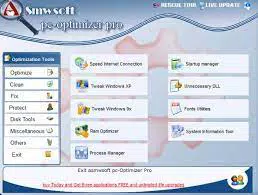
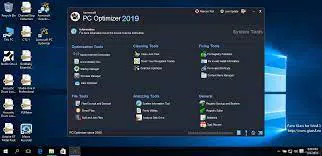
Asmw PC-Optimizer Pro presents a clean, organized interface designed for ease of navigation. The main dashboard displays key tools in clearly labeled sections, allowing users to access functions without extensive training. Visual cues and progress indicators help users track the status of ongoing tasks such as disk scans or file deletions. Navigation follows a logical flow, with tool categories grouped by purpose—such as cleanup, privacy, and system tweaks—ensuring a consistent user experience.
Although the developer did not list formal performance metrics, the software appears optimized for responsiveness on standard Windows systems. Users can expect smooth operation during routine tasks like file scanning and cleanup. Stability is maintained through regular background checks and error handling mechanisms.
The application does not report excessive resource usage during execution, suggesting efficient memory and CPU utilization. However, specific performance benchmarks across different device categories were not disclosed. Compatibility with various Windows versions (from 9x to XP) indicates broad support, though modern OS compatibility was not confirmed.
Overall, the UX design prioritizes clarity and functionality, making it accessible to users with varying technical backgrounds.
Platform Compatibility & Technical Requirements
Asmw PC-Optimizer Pro is designed exclusively for the Windows platform. It supports Windows operating systems ranging from Windows 9x to Windows XP, reflecting its legacy focus. The software has a file size of 12.7 MB, indicating a lightweight footprint suitable for older or low-resource systems. The current version is 2.5.1, released on February 14, 2024. While the developer did not specify minimum OS requirements or hardware specifications, the app’s small size and compatibility with older Windows versions suggest it is intended for use on legacy systems.
Users should verify system compatibility before installation, especially if running modern Windows versions such as Windows 10 or 11. The absence of updated OS support information means that performance and functionality on newer platforms remain uncertain. No additional software dependencies were listed. The installation process is likely straightforward, given the app’s size and purpose. For users seeking optimization tools on current systems, it is advisable to confirm compatibility with their specific environment before proceeding.
Pros and Cons
- Comprehensive suite of over 30 system maintenance tools
- Lightweight file size (12.7 MB) suitable for older systems
- User-friendly interface with intuitive navigation
- Offers privacy protection and secure file deletion
- Includes a one-step maintenance wizard for automated system checks
- Supports customization of advanced, undocumented Windows settings
- Compatibility with modern Windows versions not confirmed
- Developer did not provide detailed system requirements
- Performance on newer hardware or OS versions not tested
- Limited availability of technical documentation or user guides
- Price point of $19.99 may be high for a legacy-focused tool
FAQ
Is Asmw PC-Optimizer Pro safe to use?
The software is developed by Asmwsoft and designed to perform system maintenance tasks. However, users should exercise caution when modifying registry entries or using advanced settings, as incorrect changes may affect system stability.
Can I use this app on Windows 10 or Windows 11?
The developer lists compatibility with Windows 9x to XP. Specific support for Windows 10 or 11 was not confirmed. Users are advised to test the application in a safe environment before full deployment.
Does the software require an internet connection?
While the app may function offline, certain features like updates or online plug-in checks might require internet access. The developer did not specify exact connectivity needs.
How often should I run the PC Maintenance Wizard?
It is recommended to schedule the wizard weekly or monthly based on system usage. The tool allows users to set custom intervals for automated maintenance.
Can I recover files after using the Secure Shredder?
Files deleted using the Secure Shredder are permanently erased using overwrite techniques, making recovery impossible through standard data recovery methods.
Final Thoughts
Asmw PC-Optimizer Pro stands out as a feature-rich system utility tailored for users managing older Windows systems. Its blend of cleanup, privacy, and customization tools offers a practical solution for maintaining performance and security. While its legacy focus limits modern compatibility, it remains a viable option for users with compatible hardware and software environments.
The inclusion of a one-step maintenance wizard, secure deletion, and internet booster adds significant value for those seeking a centralized optimization tool. Despite the lack of updated OS support and limited documentation, the app delivers on its core promises with a clean interface and efficient operation. For users operating on Windows 9x to XP, Asmw PC-Optimizer Pro provides a robust, all-in-one maintenance experience.
Download Asmw PC-Optimizer pro now


